
SELECT A BOOK:


Export Progress Window
When you export a QuarkXPress document to HTML, the Export Progress window displays, showing Web page statistics and any problems there may be with exporting the document.
To display the exported page in a preferred browser, click Open in Browser. Check Automatically to always open exported pages in a browser.
To collapse the window, click on the triangle before Statistics and/or Problems.
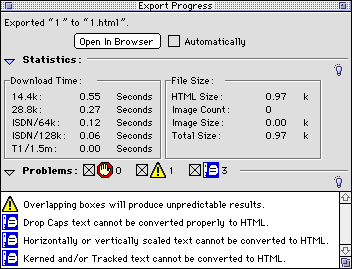
There are three types of export error messages. Double-click on each error icon and the problem item will be highlighted in the QuarkXPress document.
For more information about error messages, go to the next page.


SELECT A CHAPTER:
SELECT A TOPIC:
Export Progress Window