
SELECT A BOOK:


Extensis Menu and Keyboard Shortcuts
Accessing Palettes and Preferences
Use the following keyboard commands to Show or Hide the indicated palette or dialog box.
These key commands can be edited from the Extensis > Edit Key Commands menu (QuarkXPress v4.x only):
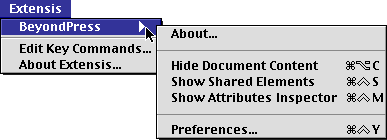
| Show/Hide | Macintosh | Windows | |
| Document Content Palette | Command+Option+C | Control+Alt+C | |
| Elements Palette | Command+Control+S | Control+Shift+S | |
| Attributes Inspector | Command+Control+M | Control+Shift+M | |
| BeyondPress Preferences | Command+Control+Y | Control+Alt+Y | |
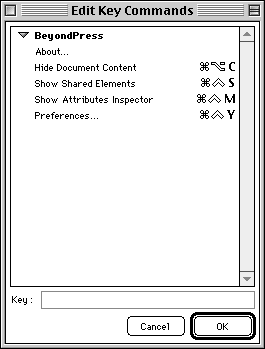
Select the option to Edit Key Commands..., enter the new key combination into the Key field, and click OK
.
Keyboard Commands which are not editable:
Use these keyboard commands to anchor images, apply BeyondPress Master Styles, segment text chains, and create links. When applying Master Styles, you can combine the Command and Shift keys (Macintosh) or Control and Shift keys (Windows) to select ranges of text, then press F14. Type the first few letters of the style you want to apply, then click OK.
| Function Performed | Macintosh | Windows |
| Anchor image in text | F14 | F14 |
| Create link from image | F15 | F15 |
| Apply HTML style (Master Style) to text | F14 | F14 |
| Create link from text | F15 | F15 |
| Segment text chain | Shift+F15 | Shift+F15 |


SELECT A CHAPTER:
SELECT A TOPIC:
Keyboard Shortcuts