
SELECT A BOOK:


SELECT A CHAPTER:
Using the Target Window:
Although BeyondPress does not automatically generate the <Frameset> code for you, it does acknowledge the fact that you may be incorporating the HTML files you have created within a Frame. The importance of this is that it allows you to establish links from one frame to another, or from one window to another via the Target command.
The Target window allows for linking between frames. You can call the frame cell by the name it was given in the <FrameSet> or you can select from the Target Pop up Menu.
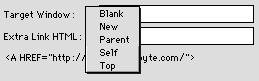
Blank directs the browser to open a new window with the linked document, leaving the old window unaffected.
New same as _blank.
Parent directs the browser to update the parent frame if the frame containing the hyperlink is a child frame. Otherwise, _parent has the same effect as _self.
Self directs the browser to update the frame containing the selected hyperlink. This is usually the default target when no target is specified.
Top directs the browser to update the entire window, regardless of the current frame layout.
Using the Extra HTML:
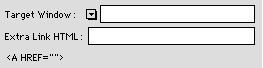
The Extra HTML field allows you to incorporate the dynamic linking features of JavaScript. Primarily the mouseon, mouseoff rollover settings.
For more information on JavaScript (which can be implemented as a Master Element set in your META tag field) visit the HTML GOODIES site.


SELECT A TOPIC:
Creating Hyperlinks and Image Maps
Storing Frequently Used Addresses
Creating a Link Within a Web Page
The Target Window and Extra HTML