
SELECT A BOOK:


SELECT A CHAPTER:
Converting QuarkXPress Documents to Web Pages: Introduction
BeyondPress automates many steps involved in exporting the contents of a QuarkXPress document to an HTML file. Generally, you'll perform a combination of the following tasks to export an Web page:
* Set up preferences for export such as style sheet mapping, text colors, table and list formatting, image and media file formatting, and default file formats.
* Generate a list of the contents of the document. Divide the list into separate Web pages, then rearrange, delete, and add new items as necessary.
* Add multimedia elements.
* Fine-tune text by enabling Cascading Style Sheets, the Font Face HTML tag, and Bitstream's TrueDoc font technology. Apply Custom HTML tags and use options to export text as a list, table, or image.
* Link text and images to URLs or to other text in your Web pages; create image maps.
* Use image formatting options to crop, scale, choose a color palette, specify alignment, and change the transparency and file format of images.
* Format the Web page by selecting a background color/image, choosing colors for text, and adding headers and footers.
* Preview selected elements or the entire Web page in your preferred browser.
Everything you need to accomplish these tasks is in the BeyondPress Preferences dialog box [Extensis>BeyondPress>Preferences or Command-Control- Y (Macintosh) or Control-Alt-Y (Windows)] and the Document Content palette [ Extensis>BeyondPress>Show Document Content, or Command-Option-C (Macintosh), or Control-Alt-C (Windows)].
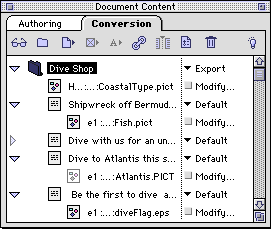
The top portion of the Document Content Palette provides buttons for manipulating content and icons for adding new items to an Web page. The lower portion contains the Content List -- a modifiable list of all the content elements and additional items you want to export.
To the right of each element, in the HTML column, the "Modify" button or text-style pop-up menu lets you manipulate and prepare elements of your QuarkXPress document for conversion to Web formats.
 Converting QuarkXPress Documents: Overview | Setting List Document Preferences
SELECT A TOPIC:
Converting QuarkXPress Documents to Web Pages: Overview
Converting QuarkXPress Documents to Web Pages: Introduction, Part II