
SELECT A BOOK:


SELECT A CHAPTER:
Adding Headers, Footers, and Meta Tags
Headers and footers repeat information -- such as logos and copyright information -- at the top and bottom of a Web page.
Meta tags embed information in the <HEAD> tag of a Web page. The Meta tag information is used by the server and search engines and is not displayed in the Web page.
In BeyondPress, headers, footers, and Meta tags consist of default Master Elements or elements you create in Master Elements Preferences.
1 Open Web Page Preferences (click Preferences  on the Document Content palette, then click Web Page.)
2 Choose from the list of Master Elements in the Meta tags, Header, and Footer pop-up menus.
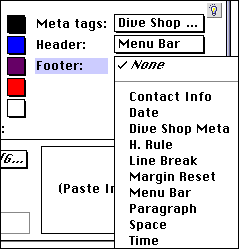
3 If you need a different Master Element, switch to the HTML pane of the Elements palette and create it. Then switch back to Web Page Preferences to choose it from one of the pop-up menus.
4 Click OK to close BeyondPress Preferences and save changes.
Note: Headers and footers are a good place to use Date and Time Master Elements, described on the next page.


SELECT A TOPIC:
Adding Headers, Footers, and Meta Tags