
SELECT A BOOK:


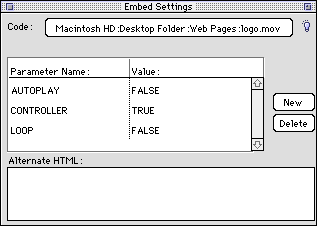
Embed Settings of the Attributes Inspector
By opening the Attributes Inspector  and selecting a QuickTime, Shockwave, RealAudio, PDF, VRML, MIDI audio, WAV audio file, or other embedded media item, Embed Settings will display. BeyondPress uses the Embed HTML tag to place these files in HTML. Use Embed Settings to override Media Preferences for a specific file.
For more information, go to:
Authoring Mode
* Adding Multimedia to Web Pages
* Multimedia Sources on the Web
 Applet Settings of the Attributes Inspector | BeyondPress Preferences: Introduction
SELECT A CHAPTER:
SELECT A TOPIC:
Attributes Inspector: Introduction
Text Box Settings of the Attributes Inspector
Image Settings of the Attributes Inspector
Web Page Settings of the Attributes Inspector
Applet Settings of the Attributes Inspector
Embed Settings of the Attributes Inspector