
SELECT A BOOK:


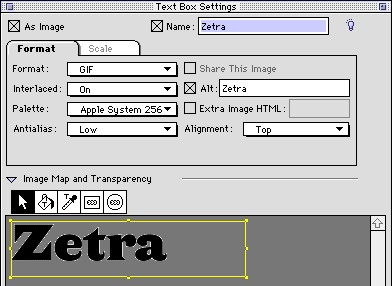
Text Box Settings of the Attributes Inspector
By opening the Attributes Inspector  on the Document Content Palette: Authoring Mode and selecting a text box, Text Box Settings will display.
Use Text Box Settings to convert text, such as a logo, to an image. When you convert text to an image, you can select image formats and modifications, including antialiasing, optimized color palettes, transparency, image maps, Alt tags, and Extra Image HTML.
For more information, go to:
* Converting Text to an Image and Antialiasing
 Attributes Inspector: Introduction | Image Settings of the Attributes Inspector
SELECT A CHAPTER:
SELECT A TOPIC:
Attributes Inspector: Introduction
Text Box Settings of the Attributes Inspector
Image Settings of the Attributes Inspector
Web Page Settings of the Attributes Inspector