
SELECT A BOOK:


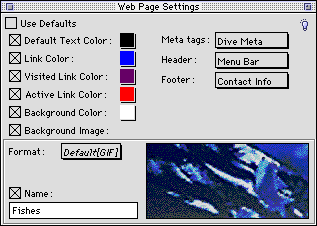
Web Page Settings of the Attributes Inspector
By opening the Attributes Inspector  and clicking on the pasteboard or a white space between text and picture boxes of your QuarkXPress document page, Web Page Settings will display. Uncheck Use Defaults and use Web Page Settings to override Web Page Preferences for a specific page.
The settings apply to the page whose number is displayed in the lower left corner of the QuarkXPress document window.
For more information, go to:
* Background Colors and Images
* Adding Headers, Footers, and Meta Tags
* Adding a Date and Time Stamp
 Image Settings of the Attributes Inspector | Applet Settings of the Attributes Inspector
SELECT A CHAPTER:
SELECT A TOPIC:
Attributes Inspector: Introduction
Text Box Settings of the Attributes Inspector
Image Settings of the Attributes Inspector
Web Page Settings of the Attributes Inspector