
SELECT A BOOK:


SELECT A CHAPTER:
Segmenting a Text Chain
In addition to creating Text Ranges, you can segment a Text Chain into several separate Text Chains to divide parts of a QuarkXPress document into Web pages. This allows you to rearrange parts of a continuous story, export parts of a Text Chain in separate Web pages, and format parts of the story differently. You can segment any Text Chain into as many smaller Text Chains as you want.
1 Select a Text Chain  in the Content List (you cannot segment Anchored Text or a Text Range).
2 Click Segment Text Chain on the Document Content palette.
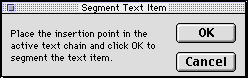
3 A dialog box prompts you to place the text insertion point in the story to specify where you want to segment it.
Two separate Text Chains are created from the text on either side of the text insertion point. Colored brackets in the document mark the beginning and end of a text segment.
4 To further segment a Text Chain, select it in the Content List and click Segment Text Chain again.
Note: To rejoin two continuous segments, drag one segment on top of another.
 Adding New Elements to a Web Page | Deleting Elements and Suppressing Output
SELECT A TOPIC:
Setting List Document Preferences
Adding New Elements to a Web Page
Segmenting a Text Chain