
SELECT A BOOK:


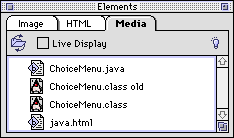
Media Pane of the Elements Palette
Open the Media pane by selecting the Media tab of the Elements palette.
By clicking Locate Folder  and selecting the folder that contains your Web page media files, a media file list is created in the Media Pane.This also designates the Media Folder in the BeyondPress Site preference pane. To place media files, drag them from the Image pane onto a QuarkXPress page.
Once media files are added to the list, they are like Shared Images.
By checking Live Display, files added to Web pages from the Media Pane will "play" on the QuarkXPress page.
The types of media files available in the list are determined by Media Preferences.
For more information, click on a topic:
Authoring Mode
* Adding Multimedia to Web Pages
Conversion Mode
* Adding Multimedia to Web Pages
 HTML Pane of the Elements Palette | Attributes Inspector: Introduction
SELECT A CHAPTER:
SELECT A TOPIC:
Elements Palette: Introduction
Image Pane of the Elements Palette
HTML Pane of the Elements Palette
Media Pane of the Elements Palette