
SELECT A BOOK:


SELECT A CHAPTER:
Using Master and Custom Elements
Master and Custom Elements can be dragged into the Document Content List and placed precisely where you want them to appear on your Web pages.
To add default Master Elements to the Content List
The row of icons on the HTML pane of the Elements palette, except the Custom icon  , represent the default Master Elements. To add one to the Content List, drag its icon into position in the list.
Element Icon
| Paragraph return (Return) |  |
| Line break (Shift-Return) |  |
| Space (Space Bar) |  |
| Horizontal Rule |  |
| Date |  |
| Time |  |
| Margin Reset |  |
To add Master or Custom Elements to the Content List
Drag the Custom icon  into position in the Content List. Use the Edit Custom Element dialog box to either:
* Choose an option from the Master Element pop-up menu, which lists the elements defined in the HTML pane of the Elements palette, i.e. all Master Elements.
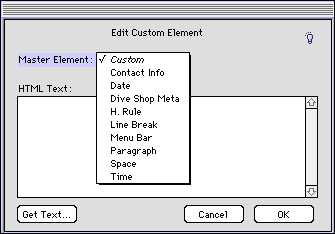
* Create a Custom Element by entering text into the HTML Text field or clicking Get Text to import a text file.
 Editing or Deleting Master Elements | Modifying Master and Custom Elements
SELECT A TOPIC:
Creating Master and Custom Elements
Editing or Deleting Master Elements
Using Master and Custom Elements