
SELECT A BOOK:


SELECT A CHAPTER:
Modifying Master and Custom Elements
You can change individual Master Elements you've added to the Content List, for example, changing a line break to a paragraph return.
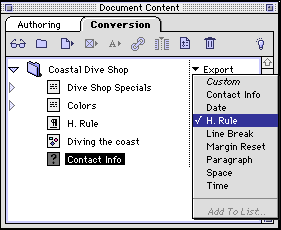
* To change a Master Element, select it in Content List. Choose an option from the Master Elements pop-up menu, which lists "Custom" and all the Master Elements.
 Using Master and Custom Elements | Using Master Elements as Header, Footer, and Meta Tags
SELECT A TOPIC:
Creating Master and Custom Elements
Editing or Deleting Master Elements
Using Master and Custom Elements
Modifying Master and Custom Elements