
SELECT A BOOK:


SELECT A CHAPTER:
Converting Text to a Table
BeyondPress converts tabular data in a QuarkXPress document to tables. You can map style sheets to table styles or you can convert a range of text to a table. The alignment of the text inside the table cells is based on the tab alignment in QuarkXPress.
Mapping style sheets to table formatting
1 Open Mapping Preferences (click Preferences  on the Document Content palette, then click Mapping).
2 To map a style sheet to table formatting, choose As Table from its pop-up menus in the Map To column.
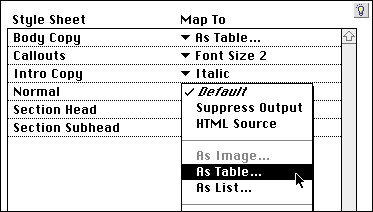
3 Table Settings opens so you can override Table Preferences for tables generated from this style sheet. To change any of the settings, uncheck Use Defaults.
4 Click OK to close Table Settings; click OK to close BeyondPress Preferences and save changes.
Converting a range of text to a table
1 Select any text element in the Content List and choose As Table from the HTML pop-up menu.
2 Table Settings opens so you can override Table Preferences for this table. To change any of the settings, uncheck Use Defaults.
3 Click OK to close Table Settings.
4 To preview the Table, select it in the Content List and click Preview  .
.
Note: You may want to isolate a range of text to format it as a table. To do so, highlight the text in the QuarkXPress document. Click Add Text  .
.
If the text box wasn't already in the Content List, the entire contents of the box is listed as a Text Chain  . The range of text you highlighted is displayed as a Text Range
  under the parent Text Chain.
Best results are achieved by selecting one or more entire paragraphs.
 Specifying Default Formatting for Tables | Specifying Default Formatting for Lists, Part I
SELECT A TOPIC:
Specifying Default Formatting for Tables
Converting Text to a Table
Specifying Default Formatting for Lists, Part I
Specifying Default Formatting for Lists, Part II