
SELECT A BOOK:


SELECT A CHAPTER:
Specifying Default Formatting for Lists, Part I
List Preferences let you customize list formatting. If you don't change any of the default List Preferences, text exported as a list is formatted according to the browser's preferences.
1 Open List Preferences (click Preferences  on the Document Content palette, then click List).
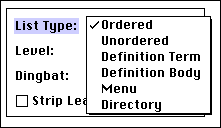
2 Choose a List Type from the pop-up menu. The following examples are lists previewed in Netscape Navigator 3.0.
* Ordered: Consecutive numbers followed by periods are added to each paragraph.
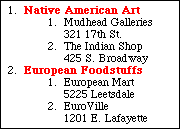
Categories (Art and Foodstuffs) are in Ordered List Level 1. Store names are in Ordered List Level 2.
* Unordered: Bullets are added to each paragraph.
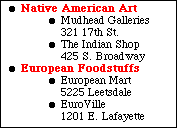
Categories (Art and Foodstuffs) are in Unordered List Level 1. Store names are in Unordered Level List 2.
 Converting Text to a Table | Specifying Default Formatting for Lists, Part II
SELECT A TOPIC:
Specifying Default Formatting for Tables
Specifying Default Formatting for Lists, Part I
Specifying Default Formatting for Lists, Part II