
SELECT A BOOK:


SELECT A CHAPTER:
Converting Text to a List, Part I
You can map style sheets to list styles or you can convert a range of text to a list. If you're using the Definition Term and Definition Body list styles, it may be easier to map style sheets than separate text into multiple Text Ranges or Text Segments that can be converted.
Mapping style sheets to list formatting
1 Open Mapping Preferences (click Preferences  on the Document Content palette, then click Mapping).
2 To map a style sheet to list formatting, choose As List from its pop-up menu in the Map To column.
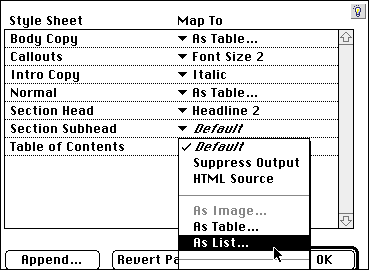
3 List Settings opens so you can override List Preferences for lists generated from this style sheet. To change any of the settings, uncheck Use Defaults.
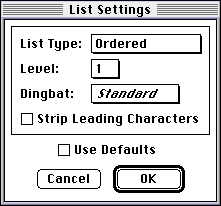
4 Click OK to close List Settings; click OK to close BeyondPress Preferences and save changes.
 Specifying Default Formatting for Lists, Part II | Converting Text to a List, Part II
SELECT A TOPIC:
Specifying Default Formatting for Tables
Specifying Default Formatting for Lists, Part I
Specifying Default Formatting for Lists, Part II
Converting Text to a List, Part I