
SELECT A BOOK:


SELECT A CHAPTER:
Mapping Style Sheets
Mapping Preferences let you specify how QuarkXPress style sheets are converted to HTML styles. You can override style sheet mapping to change the style of individual text elements using the Document Content palette. To map style sheets:
1 Open Mapping Preferences (click Preferences  on the Document Content palette, then click Mapping).
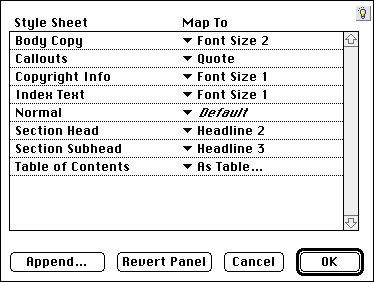
2 The Style Sheets column lists all the style sheets defined for the active document. Use the pop-up menus in the Map To column to choose HTML styles for style sheets. (To add more HTML styles to the list, see Creating Master Styles.)
The pop-up menus in the Map To column include the following options:
- - Not tagged other than BeyondPress default text formatting.
- Output - Not exported to the HTML file.
- Source - Not altered; text exported directly to HTML without conversion.
- List - Exported as an HTML list; use the List Settings dialog box to customize the list formatting for each style sheet.
- Table - Exported as an HTML table; use the Table Settings dialog box to customize the table formatting for each style sheet.
- tags - Tagged with the appropriate HTML style and the BeyondPress default text formatting.
Note: Text in the QuarkXPress document with No Style applied is mapped to Default.


SELECT A TOPIC:
Cascading Style Sheets and Font Name Tags
Mapping Style Sheets
Editing and Using Master Styles