

SELECT A BOOK:


SELECT A CHAPTER:
Link Text Attributes
To set colors for linked text for all pages:
* Open Web Page Preferences (click Preferences  on the Document Content palette, then click Web Page).
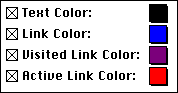
* Text Color: Specifies the default color for all unlinked text in a Web page.
Note: If you check Convert Text Color in Export Preferences, then the default Text Color only applies to black text in the QuarkXPress document. Colored text in the document will be converted to a similar color in the Web page.
* Link Color specifies the color for link source text and the border of link source images.
* Visited Link Color specifies the color for link source text and for the border of link source images that have already been selected.
* Active Link Color specifies the color of a text or image link as it's being selected.
To choose a color:
1 Click the color button to access the Apple Color Picker, or
2 Option-click the color button to access the standard Mac OS 256-color palette.
To set colors for linked text for individual pages:
1 Select the Web page in the Content List, click on Export in the HTML column and choose Modify. The Web Page Settings dialog box will appear.
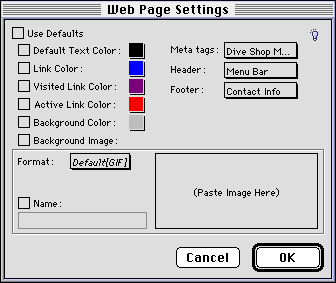
2 Make the desired changes and close the Web Page Settings dialog box.


SELECT A TOPIC:
Cascading Style Sheets and Font Name Tags
Editing and Using Master Styles
Overriding Style Sheet Mapping
Link Text Attributes