
SELECT A BOOK:


SELECT A CHAPTER:
Working with TrueDoc
BeyondPress uses Bitstream's TrueDoc font technology, supported by Netscape Navigator 4.0, to retain font types for Web pages. Netscape refers to TrueDoc as "Dynamic Fonts."
With TrueDoc enabled, BeyondPress records the character shapes from a document, compresses them, and stores them in a file -- the Portable Font Resource (PFR)
BeyondPress will create a PFR file specific to each font used on a Web page. Users with a browser supporting TrueDoc will see the fonts at the size and resolution you used on your Web page.
Note: You must have Adobe Type Manager installed to record Type 1 and Type 3 fonts.
To enable TrueDoc:
1 Open Export Preferences (click Preferences  on the Document Content palette, then click Export).
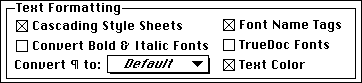
2 Click OK to close BeyondPress Preferences and save changes.
Note: When you export your pages to HTML, BeyondPress will create TrueDoc PFRs for each font you've used in your pages.
To select a destination folder for your PFRs
1 Open BeyondPress Preferences and open Site Preferences.
2 Create the appropriate URL/Folder association to identify the location of your Web Site files.
3 Identify the individual folder to place your PFR files by clicking the button labeled TrueDoc Fonts and selecting a folder within your Site Folder.
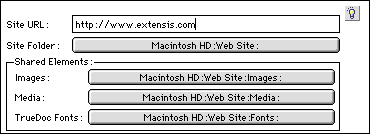
4 Click OK to close BeyondPress Preferences and save changes.
To declare TrueDoc PFR MIME type
To allow users to download and view TrueDoc PFRs, your Web server must be configured to recognize the PFR MIME type. The MIME type is:
application/font-tdpfr
The file extension is:
pfr
Your system administrator, depending on the Web server, may have to enter the extension in uppercase or lowercase (or both) and put a period before the extension.
Note: Bitstream cautions that in the future, you may have to specify an additional MIME type, such as:
/font/truedoc
For more information, go to: http://www.truedoc.com/webpages/intro/index.html.
 Cascading Style Sheets and Font Name Tags | Mapping Style Sheets
SELECT A TOPIC:
Cascading Style Sheets and Font Name Tags
Working with TrueDoc