
SELECT A BOOK:


SELECT A CHAPTER:
Mapping Font Sizes
Mapping Font Sizes is a way of controlling font sizes when you're not using Cascading Style Sheets or TrueDoc.
To map font sizes:
1 Open the BeyondPress Preferences  and click the Font Size icon.
2 Enter font sizes in the fields at left and choose HTML tags from the pop-up menu at right.
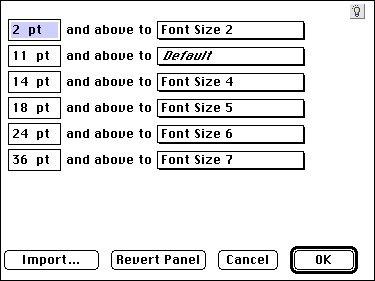
3 Click OK to close BeyondPress Preferences and save changes.
Notes on mapping font sizes
When you export a Web page, all the text in a specified font size and above (until BeyondPress reaches the next mapped font size) is mapped to the HTML tag you specify. For example, if you map 12-point text to Headline 2 and 14-point text to Headline 1, all the text between 12 points and 13.99 points is mapped to Headline 2.
You can use font size mapping and style sheet mapping together.
When you map font size and style sheets to HTML paragraph tags, such as Headline 1 or Headline 2, the style sheet mapping overrides font size mapping. However, when you map a font size to an HTML character tag, such as bold or italic, the tag is applied in addition to HTML paragraph tags applied through style sheet mapping.
For example, if you map your document's Subhead style sheet (which specifies 12-point text) to Headline 2, then you map all 12-point text to Typewriter, exported text from the Subhead style sheet will include both Headline 2 and Typewriter formatting.
If most of your documents use the same font sizes, set the default font size mapping preferences with no documents open.


SELECT A TOPIC:
Cascading Style Sheets and Font Name Tags
Editing and Using Master Styles
Mapping Font Sizes