
SELECT A BOOK:


SELECT A CHAPTER:
Controlling Text Runaround and Applying Borders
To control how text wraps around images on your Web pages, you can set defaults for alignment and text outset. You can also specify default borders for images. The alignment, text outset, and border can all be modified for individual images.
To specify text runaround and border preferences
1 Open the Image Preferences dialog box (click Preferences  on the Document Content palette, then click Image).
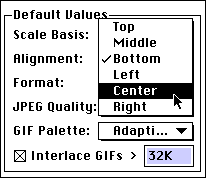
2 To specify how images align with text by default, choose an option from the Alignment pop-up menu.
* Click here for examples of Top, Middle, and Bottom image alignment.
* Click here for examples of Left, Center, and Right image alignment.
3 To specify the default text outset for images, check the HSpace and VSpace boxes and enter values in any measurement system in the fields. These values determine the text outset applied to images when they are added to the Content List.
4 To place a border around images, check Border and enter a value in any measurement system in the field. This value determines the default border applied to an image when you add it to the Content List.
Note: If you create a link from an image with a border, the border changes color to indicate the link. If you have specified a Link Color, Active Link Color, and/or a Visited Link Color in Web Page Preferences, the border will reflect those colors. Otherwise, the border will reflect the color specified in the browser's preferences. Most often, the border will be blue.
5 Click OK to close BeyondPress Preferences and save changes.
 Controlling Size, Scale, and Cropping | Changing Text Runaround and Borders
SELECT A TOPIC:
Setting Image Preferences, Part I
Setting Image Preferences, Part II
Specifying Image Format and Color Palette
Changing Image Format and Color Palette
Controlling Size, Scale, and Cropping
Controlling Text Runaround and Applying Borders
Changing Text Runaround and Borders
Changing the Transparency of GIFs