
SELECT A BOOK:


SELECT A CHAPTER:
Specifying HTML Tags and Replacement Text
BeyondPress lets you apply additional HTML tags to images. You can also supply text to substitute for images when the user is not downloading the images.
1 Select an Image  in the Content List and click Modify in the HTML column.
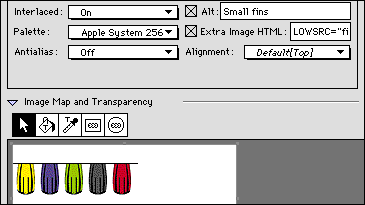
2 To have descriptive text substituted for the image if it is not downloaded, check Alt and enter text in the field.
3 To apply additional HTML tags to an image, check Extra Image HTML and enter text in the field. For example, you could include the LOWSRC tag. By using this LOWSRC command, a smaller byte version of the the picture loads immediately while the large byte filled graphic loads.
4 Click OK to close Image Settings.
 Changing the Transparency of GIFs | Importing and Using JPEG and GIF Files
SELECT A TOPIC:
Setting Image Preferences, Part I
Setting Image Preferences, Part II
Specifying Image Format and Color Palette
Changing Image Format and Color Palette
Controlling Size, Scale, and Cropping
Controlling Text Runaround and Applying Borders
Changing Text Runaround and Borders
Changing the Transparency of GIFs
Specifying HTML Tags and Replacement Text