
SELECT A BOOK:


Image Preferences Panel
Use the Image Preferences to set default preferences for all images, including image Scale, Alignment, Format, JPEG Quality, Scale, Spacing, Antialiasing, and more.Values specified here can be changed for individual images using settings on the Image Settings palette of the Attributes Inspector..
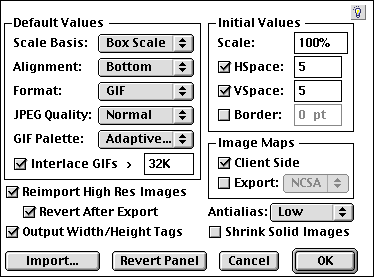
To learn more about Image Preferences, click a topic:
Authoring
* Setting Image Preferences, Part I
* Setting Image Preferences, Part II
* Specifying Image Formats and Color Palettes
* Changing the Transparency of GIFs
* Specifying HTML Tags and Replacement Text
* Importing and Using JPEG and GIF Files
Conversion
* Setting Image Preferences, Part I
* Setting Image Preferences, Part II
* Specifying Image Format and Color Palette
* Changing Image Format and Color Palette
* Controlling Size, Scale, and Cropping
* Controlling Text Runaround and Applying Borders
* Changing Text Runaround and Borders
* Changing the Transparency of GIFs
* Specifying HTML Tags and Replacement Text
* Importing and Using JPEG and GIF Files


SELECT A CHAPTER:
SELECT A TOPIC:
Image Preferences